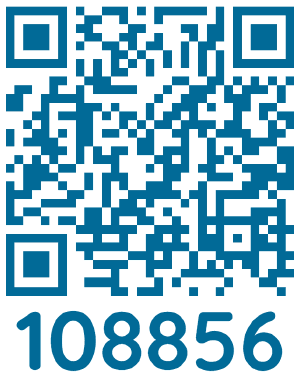
We have implemented Princh, a new printing solution, at our library. You can use your personal computer or mobile device to print to the library’s printers from home, work, or on the go. Simply submit documents for printing and come to the library during our normal hours to pay and pick up your documents at one of our two Print Release Stations.
Printing from your laptop or desktop computer:
- Begin by visiting Royal Oak Public Library Printing Service
- Upload your document(s).
- Adjust the settings.
- Accept Terms and Conditions to Continue.
- Enter your email address and Continue.
- Once your file is uploaded and you are Done, please visit the Print Release Terminals at the library to pay for and collect your print job.
Printing from your mobile device or tablet:
- Download the free Princh app* from Google Play or the App Store
- Switch to the app that contains your document and select Print from the share menu.
- Set Princh as your printer and tap the printer icon.
- Enter code 108856. Confirm ROPL as the printer location.
- Adjust settings and tap Print.
- Accept Terms and Conditions to Continue.
- Enter your email address.
- Submit print job.
- Once your file is submitted, please visit the Print Release Terminals at the library to pay for and collect your print job.
Download the Princh app:


Printing prices:
Black & White: $0.10/page; Color: $0.25/page
*If you cannot or do not wish to install the mobile app, simply scan the QR code with your device's camera and follow the instructions on the screen.